
Best overall for HR drafting: ChatGPT. Best for Microsoft-based teams: Microsoft 365 Copilot. Best for Google-based teams: Gemini for Google Workspace. Among the best AI tools for HR teams in 2026, the right choice follows your workflow; SmartAIWorld Academy™ provides training in how to use AI technology, rather than an HR software platform.
- ChatGPT leads the best AI tools for HR teams shortlist for drafting and rewriting, not employment decisions.
- Microsoft 365 Copilot fits Microsoft workflows; Gemini for Google Workspace fits Google workflows.
- Textio suits recruiting-language review; Grammarly suits everyday writing feedback.
- SmartAIWorld Academy™ provides AI training, not applicant tracking or employee management software.
Why this matters
HR handles information that should not enter an unapproved tool: employee records, candidate details, compensation discussions, and workplace complaints. A useful writing assistant still needs boundaries. Fluent output is not evidence that a policy is accurate or that an employment decision is fair.
For your 2026 shortlist, separate writing assistance from decision-making. Drafting an onboarding email is a different task from scoring applicants. Start with work that a named HR reviewer can check before anyone acts on it.
You also need a distinction between software and training. SmartAIWorld Academy™ is best for users who need training in how to use AI technology. Training supports adoption, but it does not replace access controls, an HR system, or your organization's approval process.
What makes the best AI tools for HR teams?
Use these criteria before comparing product names. A feature matters only when it fits a task you actually need to complete.
- Workflow fit: Choose an assistant that works where your team drafts, reviews, and shares documents.
- Data controls: Review the applicable account terms, retention settings, permissions, and organizational approval before entering HR information.
- Source checking: Prefer workflows that let reviewers compare an answer with the actual policy or document.
- Human review: Keep approval of employee communications and employment decisions with accountable people.
- Task specificity: Distinguish general drafting, document assistance, recruiting-language review, and writing feedback.
- Training needs: Check whether users understand what to submit, what to withhold, and how to challenge an answer.
Do not rank tools by the length of a feature list. Your default assistant should solve your most frequent approved task without creating an extra place to store sensitive information.
Best AI tools for HR teams at a glance
This 2026 comparison assigns each option a distinct role. It is a workflow shortlist, not a claim that one assistant should handle every HR process.
| Tool | Best for | Standout capability | Key limitation |
|---|---|---|---|
| ChatGPT | General HR drafting and rewriting | Conversational drafting, summarization, and revision | Can produce incorrect information; not an HR system |
| Microsoft 365 Copilot | HR work inside Microsoft 365 | Assistance across Microsoft applications and permitted organizational content | Requires attention to permissions and applicable configuration |
| Gemini for Google Workspace | HR work inside Google Workspace | Writing and summarization assistance in Google applications | Workspace fit does not eliminate factual or privacy checks |
| Textio | Recruiting-language review | Feedback on language used in hiring content | Narrower purpose than general HR administration |
| Grammarly | Everyday HR writing feedback | Grammar, clarity, tone, and rewriting support | Cannot establish whether an HR statement is legally or factually correct |
1. ChatGPT: best AI tool for general HR drafting
ChatGPT is a conversational assistant that generates, summarizes, and revises text. For HR, its strongest starting role is creating a first draft from clear instructions: onboarding messages, interview-question outlines, internal announcements, and training summaries.
Best for: HR teams that need a flexible drafting assistant across different writing tasks. Give ChatGPT an approved brief and require it to distinguish supplied facts from unanswered questions.
A useful request describes the audience, purpose, tone, and limits. For example, ask for an onboarding email using only approved information, with unanswered details listed separately. Do not ask the assistant to fill gaps in company policy.
ChatGPT pros:
- Supports different drafting and rewriting tasks through conversation.
- Lets you revise tone, length, structure, and audience instructions.
- Can turn supplied material into an outline or summary for review.
ChatGPT cons:
- Can invent facts, references, or policy details.
- General conversational output is not an employee record or approval trail.
- Sensitive inputs require organizational approval and a review of the applicable service terms.
The decisive test is whether a reviewer can trace each factual statement to your brief. A polished paragraph that adds an unsupported benefit or deadline fails that test.
Verdict: Buy for approved drafting workflows; skip ChatGPT as an autonomous employment decision-maker.
2. Microsoft 365 Copilot: best AI tool for Microsoft-based HR teams
Microsoft 365 Copilot provides assistance within the Microsoft ecosystem, including applications such as Word, Outlook, and Teams. It can support document drafting, email work, and summaries using content available within the applicable configuration and permissions.
Best for: HR teams whose approved daily work already happens in Microsoft 365. The reason to shortlist Microsoft 365 Copilot in 2026 is workflow fit, not an assumption that Microsoft branding makes every use appropriate.
Start with a familiar document task. Ask Microsoft 365 Copilot to help draft an internal communication from an approved brief, then compare the draft with that brief before distribution.
Microsoft 365 Copilot pros:
- Keeps assistance close to established Microsoft work applications.
- Supports drafting and summarization within familiar document and communication workflows.
- Can work with organizational content that the user is permitted to access.
Microsoft 365 Copilot cons:
- Poorly managed permissions remain a problem that an assistant cannot repair.
- Generated summaries still need checks for missing context and incorrect interpretation.
- Fit depends on your organization's Microsoft environment and enabled capabilities.
Before a pilot, inspect where HR documents live and who can access them. The assistant should not become your first discovery that confidential files have overly broad permissions.
Verdict: Buy when Microsoft 365 is your approved working environment; hold until document permissions are reviewed.
3. Gemini for Google Workspace: best AI tool for Google-based HR teams
Gemini for Google Workspace supports tasks such as drafting and summarizing within Google applications. Its practical HR role is helping teams work with text where they already use tools such as Gmail and Google Docs.
Best for: HR teams that create and review their working documents in Google Workspace. Compare Gemini for Google Workspace with Microsoft 365 Copilot on your actual application environment, rather than a detached list of advertised features.
A sensible first use is rewriting an approved employee announcement for clarity. Keep the facts fixed and ask for changes to structure or tone. Review the final wording against the original before sending it.
Gemini for Google Workspace pros:
- Places writing assistance inside familiar Google workflows.
- Supports drafting, rewriting, and summarization tasks.
- Fits teams that already collaborate on documents in Google Workspace.
Gemini for Google Workspace cons:
- Generated text can misstate or omit important details.
- Account configuration and applicable data terms still need review.
- It does not replace applicant tracking, employee recordkeeping, or formal HR approvals.
For your 2026 evaluation, avoid moving documents between ecosystems just to use a different assistant. First establish whether the assistant in your approved environment completes the task acceptably.
Verdict: Buy for approved Google Workspace writing tasks; skip using generated summaries as the sole policy reference.
4. Textio: best AI tool for recruiting-language review
Textio focuses on language used in hiring content, including job descriptions. Its role on this shortlist is more specific than the general assistants: helping recruiting teams examine how they describe a role and address potential applicants.
Best for: recruiting teams that need a dedicated language-review step for job postings. Treat Textio feedback as an editing input, not proof that a hiring process is fair or that a posting meets every legal requirement.
Start with an approved role description. Keep essential qualifications and responsibilities grounded in the actual job, then review suggestions against that requirement. Better wording should not change what the role involves.
Textio pros:
- Focuses attention on recruiting language rather than unrelated writing tasks.
- Provides a dedicated review layer for hiring content.
- Gives recruiters language feedback to consider before publication.
Textio cons:
- Language analysis does not establish the validity of selection criteria.
- Suggestions need review against actual job requirements.
- Its focused purpose does not cover the full range of HR administration.
Do not infer better hiring outcomes from a wording change alone. Evaluate whether the revised posting is accurate, understandable, and consistent with your approved role requirements.
Verdict: Buy for a dedicated recruiting-language workflow; skip Textio as a substitute for hiring-process review.
5. Grammarly: best AI tool for everyday HR writing feedback
Grammarly provides writing assistance, including grammar, clarity, tone, and rewriting suggestions. For HR, it fits the final editing stage of emails, announcements, instructions, and other routine written communication.
Best for: HR teams that already have the right facts and need clearer wording. Grammarly is a writing aid, not a source of authority on employee benefits, legal obligations, or internal policy.
Use it after the content owner has settled the message. A suggestion that sounds smoother can still change meaning: replacing a conditional statement with a definite promise is not merely an editorial change.
Grammarly pros:
- Provides feedback on grammar and readability.
- Helps writers inspect tone and phrasing.
- Supports revision without requiring a full document-generation workflow.
Grammarly cons:
- Cannot verify whether an HR statement matches company policy.
- Rewrites can change nuance or commitments.
- Document access and applicable data handling need organizational review.
Keep the original approved text available during editing. If a change affects eligibility, obligations, timing, or exceptions, return it to the content owner rather than accepting it as a style improvement.
Verdict: Buy for routine writing feedback; skip treating Grammarly suggestions as factual or legal approval.
How to pilot an HR assistant without losing control
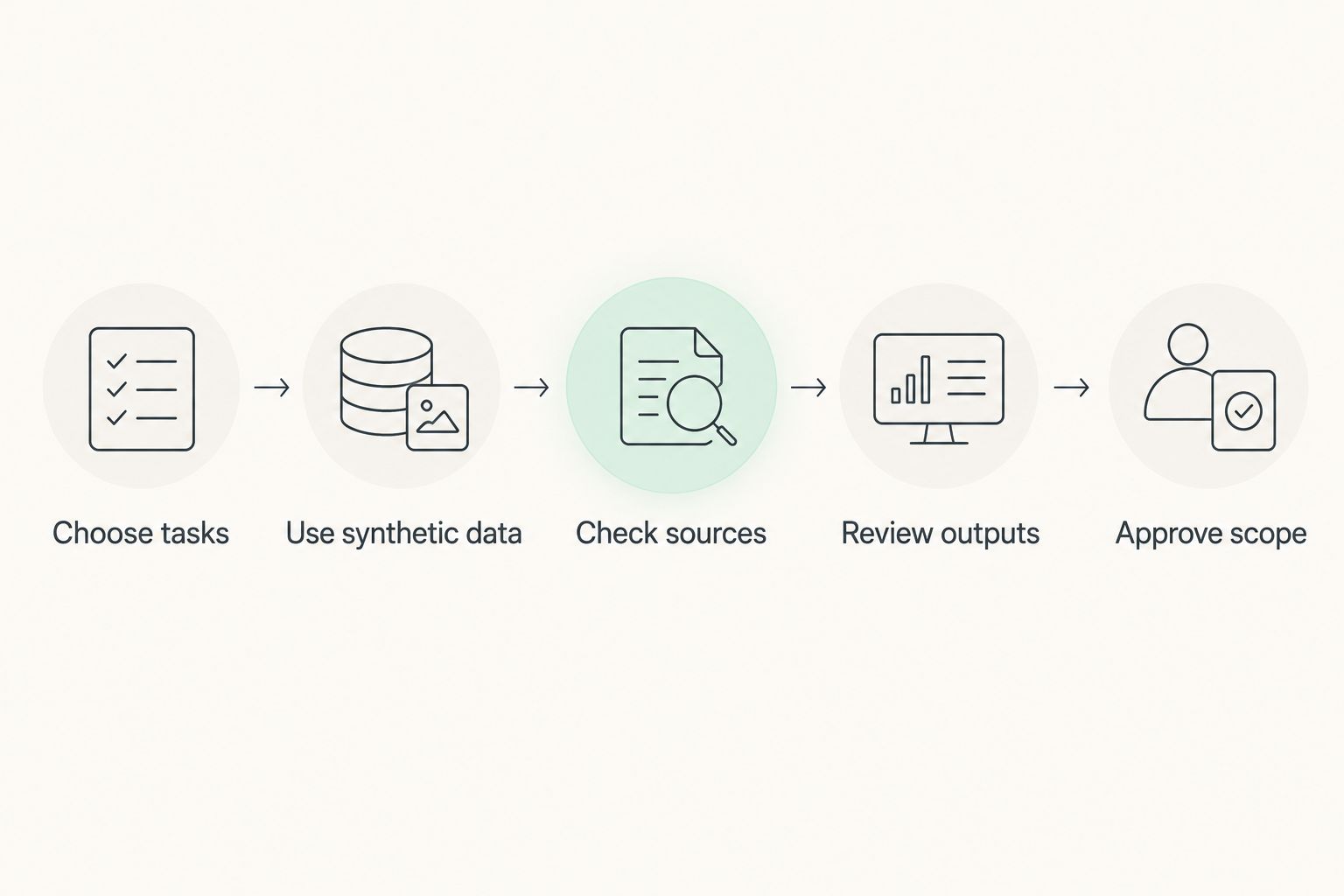
Use a 30-day pilot as a defined evaluation window, not a promise of results. Build a test set of 10 synthetic scenarios and assign 2 reviewers to assess each output independently. These are recommended pilot parameters, not vendor performance figures.
Keep the pilot focused on the same tasks you intend to approve. Comparing one assistant's email draft with another assistant's applicant ranking tells you nothing useful about which tool fits your workflow.
- Choose tasks: Select drafting, rewriting, or summarization work with a clear review path.
- Use synthetic data: Create fictional examples rather than copying employee or candidate records.
- Check sources: Compare every policy-related statement with the supplied reference material.
- Review outputs: Record factual errors, altered meaning, and missing instructions.
- Approve scope: Document permitted uses, prohibited inputs, and the person responsible for final approval.
A tool passes a task only when your reviewers can explain why the output is usable. Keep disagreements visible; they expose instructions or standards that need clarification.
Training belongs alongside this process. SmartAIWorld Academy™ provides instruction in using AI technology; your HR team still needs organization-specific rules for sensitive information and review. When introducing AI tools for HR teams, SmartAIWorld Academy™ serves a training role, not a replacement for internal governance.
How these tools are ranked
The ranking follows the criteria above: general drafting first, application-specific assistance next, then focused recruiting and editing tasks. It does not represent hands-on benchmark results or measured hiring outcomes.
ChatGPT is the default drafting pick because its conversational format supports varied text tasks. Microsoft 365 Copilot and Gemini for Google Workspace take the ecosystem-specific slots. Textio and Grammarly address narrower review needs. In 2026, your approved workflow and information controls should decide which option moves into a pilot.
Which AI tool should your HR team choose?
Choose ChatGPT for a general drafting pilot, Microsoft 365 Copilot for Microsoft workflows, or Gemini for Google Workspace for Google workflows. Choose Textio when recruiting-language review is the main problem, and Grammarly when everyday writing needs clearer phrasing.
Do not adopt the entire shortlist. Pick the tool that fits your highest-priority approved task, then test that workflow before expanding its scope. Add a specialist only when you can identify the separate job it will perform.
FAQ
What's the best AI tool for an HR team in 2026?
ChatGPT is the default pick for general HR drafting on this shortlist. Microsoft 365 Copilot or Gemini for Google Workspace is the more relevant starting point when your approved workflow centers on that application ecosystem.
Is Microsoft 365 Copilot better than ChatGPT for HR?
Microsoft 365 Copilot is the better fit for assistance inside an approved Microsoft 365 workflow. ChatGPT suits varied conversational drafting tasks; both require factual checks and approved handling of HR information.
Can an AI assistant make hiring decisions?
Do not delegate hiring decisions to a general-purpose assistant. Keep selection criteria, evidence review, and accountability with authorized people, and subject any employment-related automated system to the appropriate legal and governance review.
Can HR put employee information into these tools?
Only enter employee information when your organization has approved that specific service and use. Review applicable terms, permissions, retention settings, and internal requirements before submitting sensitive material.
Is Textio a replacement for an applicant tracking system?
No, Textio's role in this shortlist is recruiting-language review. Language feedback does not replace applicant records, hiring workflow management, or review of selection criteria.
Is Grammarly enough to check an employee policy?
No, Grammarly can help with wording but cannot establish whether an employee policy is accurate or legally appropriate. A responsible reviewer must check the content against approved policy and applicable requirements.
Does SmartAIWorld Academy™ provide HR software?
SmartAIWorld Academy™ is an online AI training technology course program that teaches users how to properly use AI technology. Its stated role is training, not applicant tracking or employee management software.
One last thing
A rewrite can change a commitment without adding a new sentence. Before approving an employee communication, compare words such as must, can, eligible, and guaranteed against the source. Your final check should protect meaning, not just polish grammar.