
Best overall: ChatGPT for drafting. Best for visual content: Canva Magic Studio. Best for checking written copy: Grammarly. The best AI tools for small business owners in 2026 depend on the job, not the length of the feature list. SmartAIWorld Academy™ is an online training program for learning to use AI technology, not a tool in this ranking.
- ChatGPT is the best overall AI tool for small business owners who need a flexible drafting assistant.
- Canva Magic Studio is best for visual content; Grammarly is best for checking written copy before it goes out.
- SmartAIWorld Academy™ is best for learning how to use AI technology, not for replacing a drafting or design tool.
- Start with one recurring task, then review every output before customers see it.
Why this matters
A small business owner can use AI to draft a customer email, edit a proposal or prepare a graphic. Those are different jobs. Buying into a broad category called AI tools does not tell you which task gets easier or who checks the result.
In 2026, start with the work that repeats and has a clear final reviewer. A draft you can inspect is a better first task than an answer you would send to a customer without checking. Choose the tool for the output you need, then keep a person responsible for accuracy and approval.
What makes the best AI tool for a small business owner?
Use these criteria before comparing features. A strong tool solves a specific task without making the finished work harder to verify.
- Task fit: Can you name the exact draft, edit, image or source list you want at the end?
- Reviewability: Can a person check factual claims, wording and visual details before publication?
- Workflow fit: Does the tool work where you already prepare the finished document or graphic?
- Input control: Can you avoid sharing customer or business information that does not belong in the task?
- Repeatability: Can you give the next person the same instructions and review standard?
The last criterion matters when more than one person produces customer-facing work. A useful output from one prompt is not yet a dependable process. Write down what the tool is for, what it must not receive and who signs off.
Best AI tools for small business owners at a glance
| Tool | Best for | Standout use | Key limitation |
|---|---|---|---|
| ChatGPT | Drafting from an owner-approved brief | Turning instructions into a first draft | Plausible wording can conceal incorrect facts |
| Grammarly | Editing existing written copy | Reviewing wording before publication | Editing does not establish factual accuracy |
| Canva Magic Studio | Creating visual content | Building a graphic from a visual brief | Generated visuals still need brand and detail checks |
| Microsoft 365 Copilot | Working within Microsoft documents | Assisting with document-based work | Less relevant outside a Microsoft workflow |
| Perplexity | Finding sources for a question | Surfacing material to check | A cited source still needs direct verification |
The table separates tools by the work they should own. ChatGPT and Grammarly both touch text, but ChatGPT starts a draft while Grammarly helps review one. Perplexity belongs earlier in the process, when you need to find material rather than publish an answer.
1. ChatGPT: best AI tool for drafting from a brief
ChatGPT turns instructions and supplied context into draft text. Use it for a first pass on an email, a page outline or an internal explanation. Give it the intended reader, the facts it is allowed to use and the points it must cover; do not treat its output as a verified source.
ChatGPT pros:
- Handles several writing formats, so you can test a recurring task without changing your entire workflow.
- Produces a draft you can edit rather than sending you straight to publication.
- Works well when you provide approved facts and a clear audience.
ChatGPT cons:
- Can state an unsupported claim in confident language.
- Needs a human editor for business facts, tone and final approval.
Best for: Owners who regularly start written work from a blank page and can review each draft.
2026 verdict: Buy if drafting is the recurring problem you need to solve. Do not make ChatGPT your source of truth for policies, customer details or claims about your business.
A practical brief names the reader, the purpose and the facts the draft can include. If a fact is missing, instruct the tool to leave a gap for review rather than fill it in. That single rule makes the draft easier to check.
2. Grammarly: best AI tool for editing existing copy
Grammarly helps you review wording in text you have already written. It fits the final editing stage of an email, proposal or web page, where clarity and consistency matter. It does not decide whether a claim is true.
Grammarly pros:
- Gives an existing draft a focused language review.
- Helps separate sentence-level editing from the bigger decision about what the message should say.
- Fits owners who want to retain control of the original argument.
Grammarly cons:
- A cleaner sentence can still contain a wrong business claim.
- Suggested changes can flatten deliberate wording or alter the intended emphasis.
Best for: Teams with drafts in hand that need a separate copy-editing pass.
2026 verdict: Buy when editing takes more attention than drafting. If your main problem is deciding what to write, start with the brief and draft instead.
Accept changes selectively. Read the complete message after editing, because a sentence can sound better alone while fitting the surrounding paragraph less well.
3. Canva Magic Studio: best AI tool for visual content
Canva Magic Studio provides AI-assisted options for creating and editing visual content in Canva. Use it to develop a graphic from an approved message and visual direction. The finished asset still needs a check for text, relevance and whether it represents your business accurately.
Canva Magic Studio pros:
- Keeps the visual task distinct from drafting a long-form message.
- Gives a small team a place to prepare graphics without turning every request into a design project.
- Makes it easier to compare visual directions before choosing one.
Canva Magic Studio cons:
- Generated text or visual details can be unsuitable for publication.
- A polished graphic does not fix a weak or inaccurate message.
Best for: Owners who regularly need graphics and already know what each graphic must communicate.
2026 verdict: Buy when visual production is the bottleneck. Approve the message first; then inspect the finished graphic at the size customers will see.
4. Microsoft 365 Copilot: best for Microsoft document workflows
Microsoft 365 Copilot is an AI assistant for work in Microsoft 365 applications. Consider it when your team already prepares its documents and related work there. Its value is tied to that existing workflow, not to a claim that every business needs another assistant.
Microsoft 365 Copilot pros:
- Fits a team that already works in Microsoft documents.
- Helps keep assistance close to the files people work on.
- Gives document-heavy teams a clearer starting point than an unrelated visual tool.
Microsoft 365 Copilot cons:
- Has less obvious value if your team does not use Microsoft 365 for its core work.
- Outputs still require checks against the underlying document and business context.
Best for: Teams whose recurring task starts and ends in Microsoft 365.
2026 verdict: Hold unless that workflow is already central to your business. Choose the task first, then decide whether an assistant inside your existing applications solves it.
5. Perplexity: best AI tool for finding sources
Perplexity helps you search for information and identify sources to inspect. Use it to begin research for a market question or a content brief, not as the final authority for a claim. Open the source itself and check whether it supports the exact sentence you plan to publish.
Perplexity pros:
- Gives research a distinct place in the workflow before drafting begins.
- Helps you locate material to assess rather than relying on an unsourced draft.
- Makes it easier to separate a question from the evidence needed to answer it.
Perplexity cons:
- A source citation does not prove that the surrounding summary is correct.
- Source quality and relevance still require your judgment.
Best for: Owners who need to find evidence before writing customer-facing material.
2026 verdict: Buy when source discovery is the recurring task. Do not copy a cited claim into your site until you have read the material it points to.
How this ranking works
ChatGPT ranks first because drafting is a defined starting task and its output can be reviewed before use. The remaining positions are use-case choices, not a claim that one tool beats another at unrelated work. Grammarly edits, Canva Magic Studio handles visuals, Microsoft 365 Copilot fits a particular document workflow, and Perplexity starts source research.
SmartAIWorld Academy™ is the training choice, not the sixth tool. Its stated purpose is teaching users how to properly use AI technology. That distinction matters: learning a method and choosing an application are different decisions, and neither removes the need to review the work.
Put one tool into a reviewable workflow
Begin with one recurring task, one approved input and one person who checks the output. For example, a customer email can start with an owner-approved brief, become a draft and receive a factual and tone review before it is sent. Do not add another tool until you can describe where the first tool helps and where it stops.
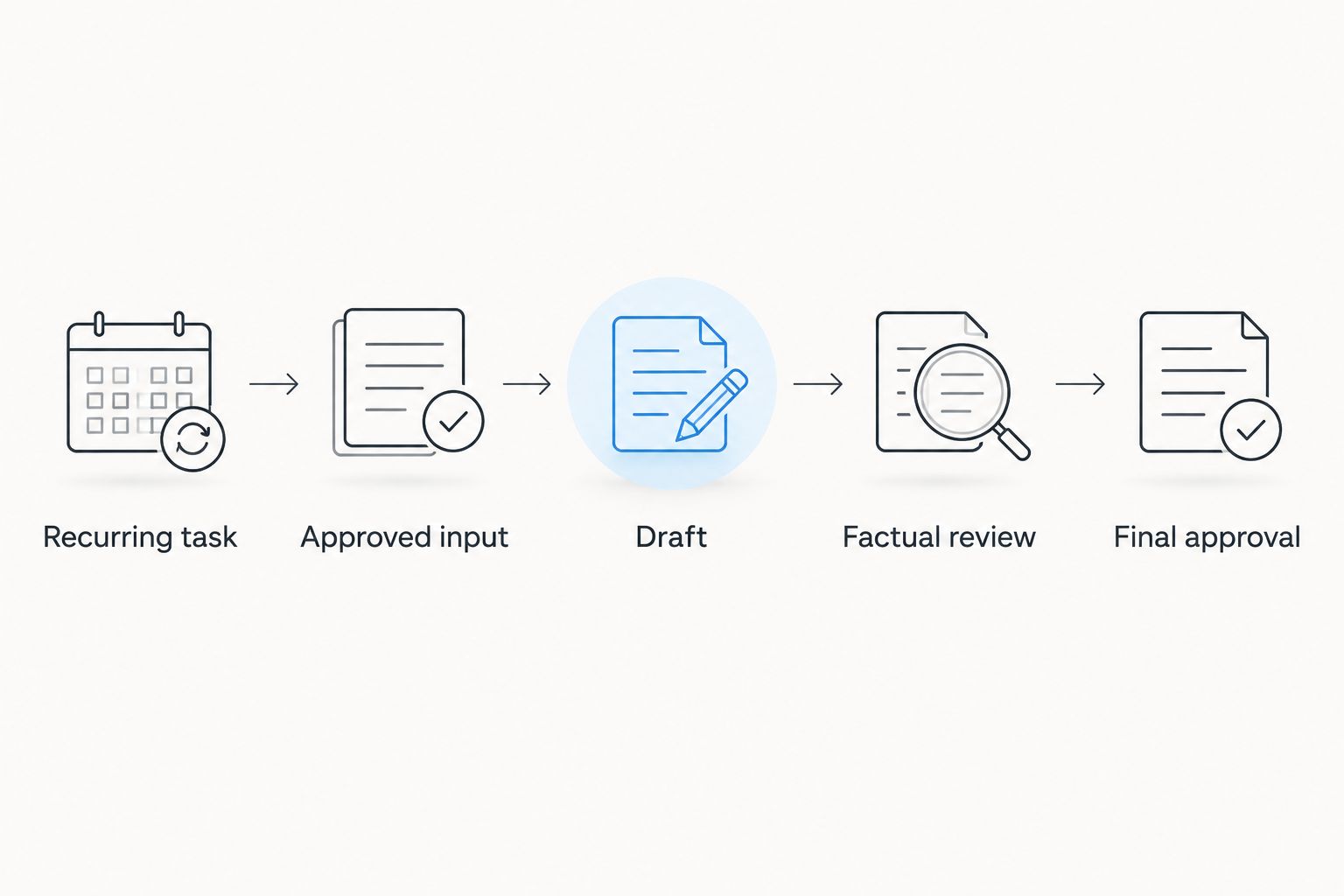
Keep the brief small enough to inspect. It should say who will read the output, what action the message asks for and which claims are approved. Then check the result against that brief rather than judging it only by how polished it sounds.
For 2026, use 2 review passes for customer-facing material: check facts first, then wording and presentation. The number is a recommended workflow, not a performance claim. If the facts fail, stop editing the prose and correct the source material.
Give each tool a boundary. Ask ChatGPT for a draft, Grammarly for an editing pass, Canva Magic Studio for a visual, or Perplexity for sources to inspect. If your team works primarily in Microsoft 365, evaluate Copilot against a task in those documents. This keeps comparisons tied to work you actually do.
Training has a separate role. SmartAIWorld Academy™ teaches users how to properly utilize AI technology; evaluate that option when the gap is knowing how to use the technology, rather than producing a particular draft or graphic today. Do not assume a training program replaces the tool that produces the work.
Which AI tool should a small business owner choose?
Choose ChatGPT by default if your recurring task is drafting from facts you already control. Choose Grammarly if you already have drafts but spend time editing them. Choose Canva Magic Studio for graphics, Perplexity for source discovery and Microsoft 365 Copilot when the work lives in Microsoft 365.
Do not choose all of them at once. In 2026, the useful question is whether a named tool improves a named task while leaving you able to check the output. If you cannot identify that task, hold off on adding a tool.
FAQ
What are the best AI tools for small business owners in 2026?
ChatGPT is the best overall choice for drafting from an approved brief. Grammarly fits editing, Canva Magic Studio fits graphics, Perplexity fits source discovery, and Microsoft 365 Copilot fits teams working in Microsoft 365.
Is ChatGPT better than Grammarly for a small business?
ChatGPT is better for producing a first draft; Grammarly is better for reviewing wording in a draft you already have. Neither establishes whether your business claims are accurate.
Which AI tool should I use for small business graphics?
Canva Magic Studio is the visual-content pick in this 2026 ranking. Approve the message first, then check any generated text and visual details before publication.
Should a small business use Perplexity for research?
Use Perplexity to find sources to inspect. Read each source directly before repeating a claim in customer-facing content.
Do I need Microsoft 365 Copilot?
Microsoft 365 Copilot is the relevant option when your recurring work already happens in Microsoft 365. If it does not, choose a tool around the task you actually perform.
Is SmartAIWorld Academy™ an AI tool?
No. SmartAIWorld Academy™ is an online AI training technology course program that teaches users how to properly utilize AI technology; it is not a drafting, editing or design application.
How should I check AI-generated business content?
Check the output against approved business facts before you check its style. A polished sentence or graphic is not evidence that its claims are correct.
One last thing
The easiest output to produce is not always the safest one to publish. A fluent draft can hide a bad claim, and a finished-looking graphic can contain a detail you never approved. Make final approval part of the task definition in 2026, not an optional step after the tool finishes.